
How Do Wi-Fi Cameras Work Without a Power Supply?
Title (TDK): How Do Wi-Fi Cameras Work Without a Power Supply? | QZT
Description: Discover how wifi camera without power supply options work, from cellular connectivity to solar charging. Learn the best off-grid security solutions for your needs.
Keyword: wifi camera without power supply
You just finished setting up your property in a remote area, far from any Wi-Fi router or power outlet. You need a security camera that can monitor everything without relying on your home network or an electrical socket. Here is the good news: modern security technology has made it entirely possible to keep a watchful eye on your property using a wifi camera without power supply infrastructure. These standalone devices connect through cellular networks, run on rechargeable batteries, or tap into solar energy, giving you complete surveillance coverage wherever you need it most.
Which Security Cameras Can Operate Without Wi-Fi?
If your property lacks a Wi-Fi connection, you are not out of luck. Several categories of cameras are specifically designed to work completely independently of your home network. These include cellular signal-ready cameras that use mobile data, local storage cameras that record to onboard memory, and battery-powered models that eliminate the need for any wired power source. Each type serves a different purpose, and understanding your specific environment is the first step toward choosing the right one.
Camera Types Designed for Off-Grid Use
The three most common categories that do not require Wi-Fi at all are:
– Cellular cameras — use a built-in SIM card to transmit footage over mobile networks
– Battery-powered cameras — run entirely on internal batteries, rechargeable via USB or solar
– Local storage cameras — record to an SD card or internal drive without needing any network connection
Many of the cameras available at QZT fall into the battery-powered and local storage categories, offering flexible placement options that do not depend on your existing infrastructure.
Why Wi-Fi Independence Matters
Remote properties, construction sites, rural barns, and vacation cabins often sit far beyond the reach of traditional home networks. Choosing a camera that operates independently gives you peace of mind without the cost and complexity of extending your internet service.

How Do Cellular Cameras Function Without Wi-Fi?
Cellular cameras replace your home Wi-Fi connection with a mobile data signal, allowing them to send live footage and motion-triggered alerts directly to your smartphone regardless of location. All you need is a compatible SIM card and a data plan. Once activated, the camera connects to the nearest cellular tower, just like a smartphone would, and begins transmitting video.
A wifi camera without power supply dependency works by using a built-in modem to access mobile networks (4G LTE or 5G in newer models). When motion is detected, the camera compresses the footage and sends it through the cellular network to a cloud server or directly to your phone via an app. Most cellular cameras support two-way audio, letting you listen in and even speak through the device remotely.
Data Usage and Plan Considerations
Standard definition video typically consumes around 300–500 MB per day, while 1080p HD footage can use 1 GB or more daily. Monthly plans generally range from $5 for light use up to $30 for continuous high-resolution streaming. For seasonal properties or weekend visits, pay-as-you-go plans can keep costs minimal.

What Are Battery-Powered Camera Options Available Today?
Battery-powered cameras give you the ultimate in placement flexibility, requiring no cables, no nearby outlets, and no Wi-Fi router to function. You can install them inside a barn, on a fence post, in a tree, or anywhere else that makes sense for your security needs. Most models run on lithium-ion batteries that last anywhere from two weeks to six months on a single charge, depending on recording frequency and environmental conditions.
Battery-powered cameras shine in scenarios such as monitoring a shed or detached garage without running power cables, keeping an eye on a boat dock or riverside property, or setting up temporary surveillance at an event or construction zone. Many battery cameras at QZT offer long standby times and motion-activated recording to extend battery life significantly.
Common Battery Life Expectations
| Camera Usage Level | Average Battery Life |
|---|---|
| Always-on recording | 1–3 days |
| Moderate motion detection (5–10 events/day) | 2–6 weeks |
| Low activity (1–2 events/day) | 2–6 months |
Understanding your expected activity level helps you choose a model with appropriate battery capacity and planning for recharging schedules.

Can Solar Panels Keep Your Camera Running Off-Grid?
Yes — pairing a solar panel with your battery-powered camera is one of the most effective ways to create a truly self-sustaining surveillance system. A small 5–10 watt solar panel can generate enough power during daylight hours to keep most cameras running indefinitely, with the battery acting as a buffer for nighttime and cloudy days. This combination eliminates the need to manually recharge batteries and makes long-term remote installations completely hands-off.
The most reliable setups pair cameras with at least a 6-watt solar panel and a battery capacity of at least 6,000 mAh. Position the solar panel facing south (in the northern hemisphere) at an angle between 30 and 45 degrees for optimal year-round sun exposure. Models with USB-C or barrel jack charging inputs make connecting a solar panel straightforward.
Limitations of Solar Power for Cameras
Cloudy seasons, winter months, and heavy shade can significantly reduce solar output. If your camera placement receives fewer than four hours of direct sunlight daily, you may need a larger solar panel or a backup charging routine. Some users combine solar with a USB Charger Camera as a secondary power source for peace of mind.
How Much Footage Can Local Storage Hold?
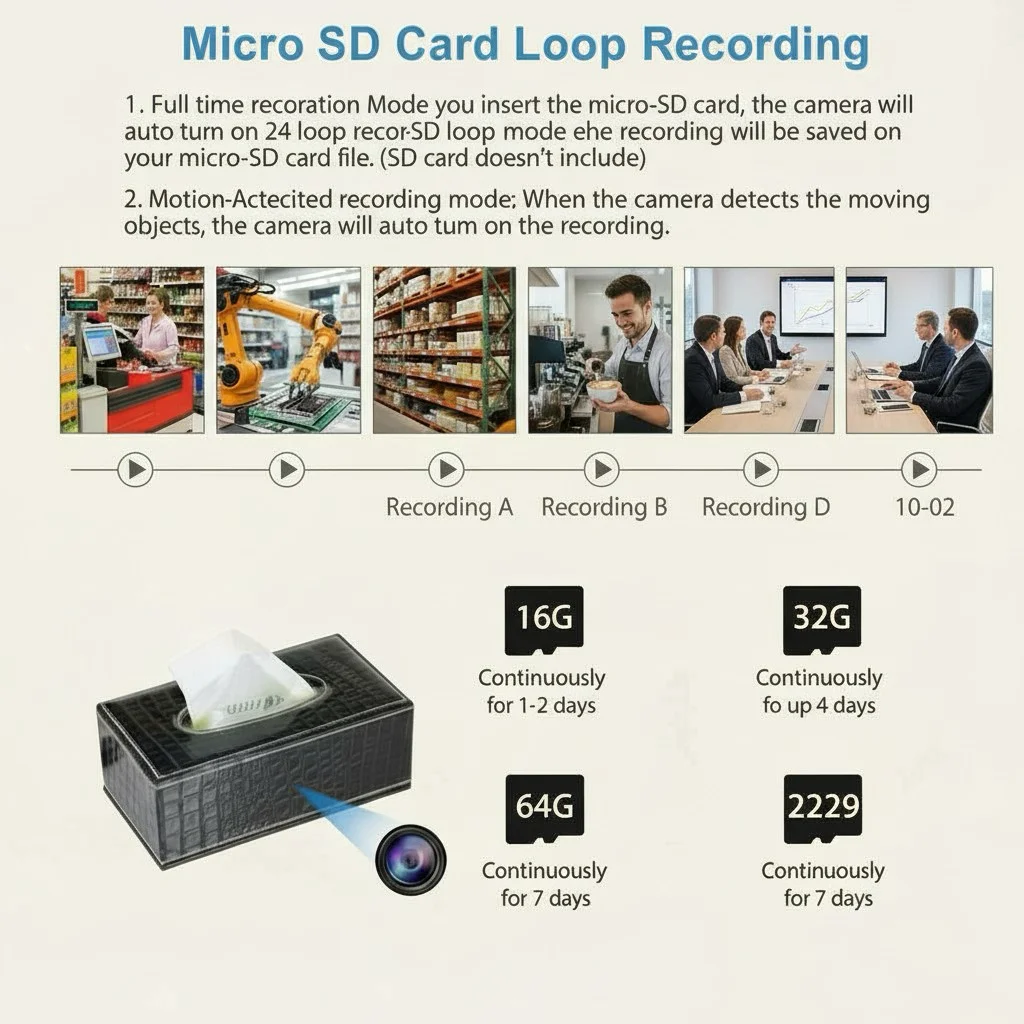
Local storage cameras record video directly to an SD card, internal flash memory, or a built-in hard drive without needing any network connection. The amount of footage they can hold depends entirely on the storage capacity you choose and the video quality settings. A 32 GB SD card can store roughly 40–80 hours of standard definition video, while a 128 GB card extends that to 160–320 hours, giving you weeks of continuous recording before overwriting begins.
Storage capacity planning is straightforward once you know your camera’s bitrate. Most 1080p cameras record at 2–4 Mbps, which means:
– 32 GB card: approximately 16–40 hours of 1080p footage
– 64 GB card: approximately 32–80 hours of 1080p footage
– 128 GB card: approximately 64–160 hours of 1080p footage
Loop recording automatically overwrites the oldest footage when the card is full, so you never have to manually delete files to keep recording.
Accessing Footage Without Internet
The main drawback of local storage is accessing your footage without Wi-Fi. Many cameras solve this with Bluetooth connectivity, allowing you to download clips to your phone when you are physically near the device. Others include a built-in Wi-Fi hotspot that lets you connect your phone directly to the camera for playback without any router involved.

Are Cameras Without Wi-Fi Hard To Install?
The short answer is no — most cameras designed to work without Wi-Fi are actually easier to install than traditional network cameras because there is no router configuration or Wi-Fi password setup required. Cellular cameras need only a charged battery, an activated SIM card, and a data plan. Battery-powered models require nothing more than mounting and turning the device on. Local storage cameras follow a similarly simple process of inserting an SD card and powering up.
For a battery-powered or cellular camera, the typical installation looks like this:
1. Fully charge the battery before first use
2. Insert the SIM card (for cellular models) and SD card
3. Download and open the camera’s mobile app
4. Scan the camera’s QR code to link it to your account
5. Mount the camera using the included bracket or adhesive
6. Adjust the viewing angle and test the field of view
7. Configure motion detection zones and notification preferences
When To Call a Professional
Professional installation becomes worthwhile when you are wiring multiple cameras across a large property, integrating cameras into an existing security hub, or installing hardwired models that connect to your electrical panel. For most standalone cellular and battery-powered cameras, a confident DIY approach is all you need.
How Do Wi-Fi and Non-Wi-Fi Cameras Compare?
Understanding the trade-offs between Wi-Fi cameras and their standalone counterparts helps you make a decision that fits your property, your budget, and your monitoring needs. While Wi-Fi cameras excel at remote live viewing and cloud integration, no-Wi-Fi cameras offer reliability and placement freedom that wired systems simply cannot match.
A wifi camera without power supply connectivity delivers continuous high-definition video through your home network, but it stops working the moment your internet goes down. Standalone cameras, by contrast, keep recording even when your entire home network is offline, making them far more dependable for critical security applications.
Key Differences at a Glance
| Característica | Cámara Wi-Fi | Cellular / Battery Camera |
|---|---|---|
| Remote viewing | Via home internet | Via cellular data |
| Power source | Wall outlet required | Battery or solar |
| Network dependency | Full | Minimal or none |
| Monthly fees | Usually none | Data plan (cellular only) |
| Installation complexity | Medio | Low to medium |
Wi-Fi cameras consume more power because they maintain a constant network connection and often stream continuously. Standalone battery cameras use significantly less power by entering deep sleep between motion events, extending battery life from days to months. Solar panels further reduce ongoing power management by providing clean, renewable energy.
What Are the Key Factors in Choosing Your Camera?
With so many options on the market, narrowing down the right camera comes down to a few critical decisions based on your specific situation. The four factors that matter most are your power availability, your internet connectivity, your storage preferences, and your budget for ongoing service fees.
For properties with no power and no internet, a solar-powered cellular camera with local storage backup is the most reliable option. If you have a stable cellular signal but no wired power, a solar panel paired with a cellular camera gives you the best of both worlds. For locations with no signal at all, a high-capacity battery camera with local storage is your best bet, allowing you to retrieve footage manually during visits.
Budget Planning for Ongoing Costs
Battery-powered and local storage cameras from QZT typically have no recurring fees, making them far more cost-effective over time than cellular cameras that require monthly data plans. If you choose a cellular model, factor in $5–$30 per month for your data plan alongside the upfront camera cost.
Conclusión
A wifi camera without power supply connectivity is not only possible — it is one of the smartest investments you can make for protecting remote properties, off-grid installations, or any location where traditional infrastructure simply does not reach. Whether you choose a cellular model for real-time alerts, a solar-powered battery camera for hands-free operation, or a local storage camera for straightforward fee-free surveillance, modern technology has made it easier than ever to stay protected without relying on your home network or power grid. This article walked you through the different camera types that operate without Wi-Fi, explained how cellular and solar power solutions work in real-world conditions, and compared the trade-offs you need to know before making a purchase. Still unsure which option fits your situation best? Contact us today and our team will help you find the perfect wifi camera without power supply solution for your specific needs, property, and budget.
Preguntas frecuentes
Can wireless cameras work without Wi-Fi entirely?
Yes — wireless cameras can operate completely without Wi-Fi by using cellular data plans, local SD card storage, or a combination of both. Cellular models send footage over mobile networks, while local storage cameras record to onboard memory without any network connection.
What is the best wifi camera without power supply option for remote areas?
The best choice for remote areas is a solar-powered cellular camera with local storage backup. This setup gives you real-time alerts through cellular connectivity while staying powered through solar energy, with no reliance on your home infrastructure.
How do I power a security camera if I have no electrical outlet?
You can power a security camera without an outlet using rechargeable lithium-ion batteries, solar panels, or a power bank. Many cameras at QZT are specifically designed for off-grid use and include USB-C or barrel jack charging inputs for flexible power management.
Do cellular cameras require a monthly subscription?
Most cellular cameras require a monthly data plan ranging from $5 to $30, depending on your video quality and storage needs. Battery-powered cameras and local storage models from QZT typically have no ongoing subscription fees, making them more cost-effective over time.
How long can a battery-powered camera record between charges?
Battery-powered cameras can record anywhere from two days (always-on mode) to six months (low-activity motion detection mode) on a single charge. Pairing your camera with a solar panel can extend operation indefinitely, making it ideal for permanent remote installations.

 English
  Italiano
  Deutsch
  Français
  Español
  Polski