
How Does a Bluetooth Speaker Camera Work in 2026?
Title (TDK): Bluetooth Speaker Camera Guide 2026: Features, Uses & How to Choose | QZT
Description: Discover how a bluetooth speaker camera works, its top features, legal considerations, and how it compares to other hidden cameras for home and office security in 2026.
Keyword: bluetooth speaker camera
You want to keep an eye on your office, home workspace, or babysitter without anything that looks like a security camera. A Bluetooth speaker is one of the most common, completely unremarkable household objects — and that is exactly what makes a bluetooth speaker camera so effective. These devices combine a fully functional wireless speaker with a high-definition hidden camera, giving you discreet 24/7 surveillance that blends seamlessly into any room.
Unlike bulky security cameras with visible lenses and mounting brackets, a speaker camera sits on a shelf, desk, or counter, looking like any other Bluetooth speaker. It plays music, takes calls, and charges your devices — all while quietly monitoring everything in its field of view. Here is everything you need to know about how these devices work, what to look for when buying one, and how to use them responsibly.
How Does a Bluetooth Speaker Camera Work?
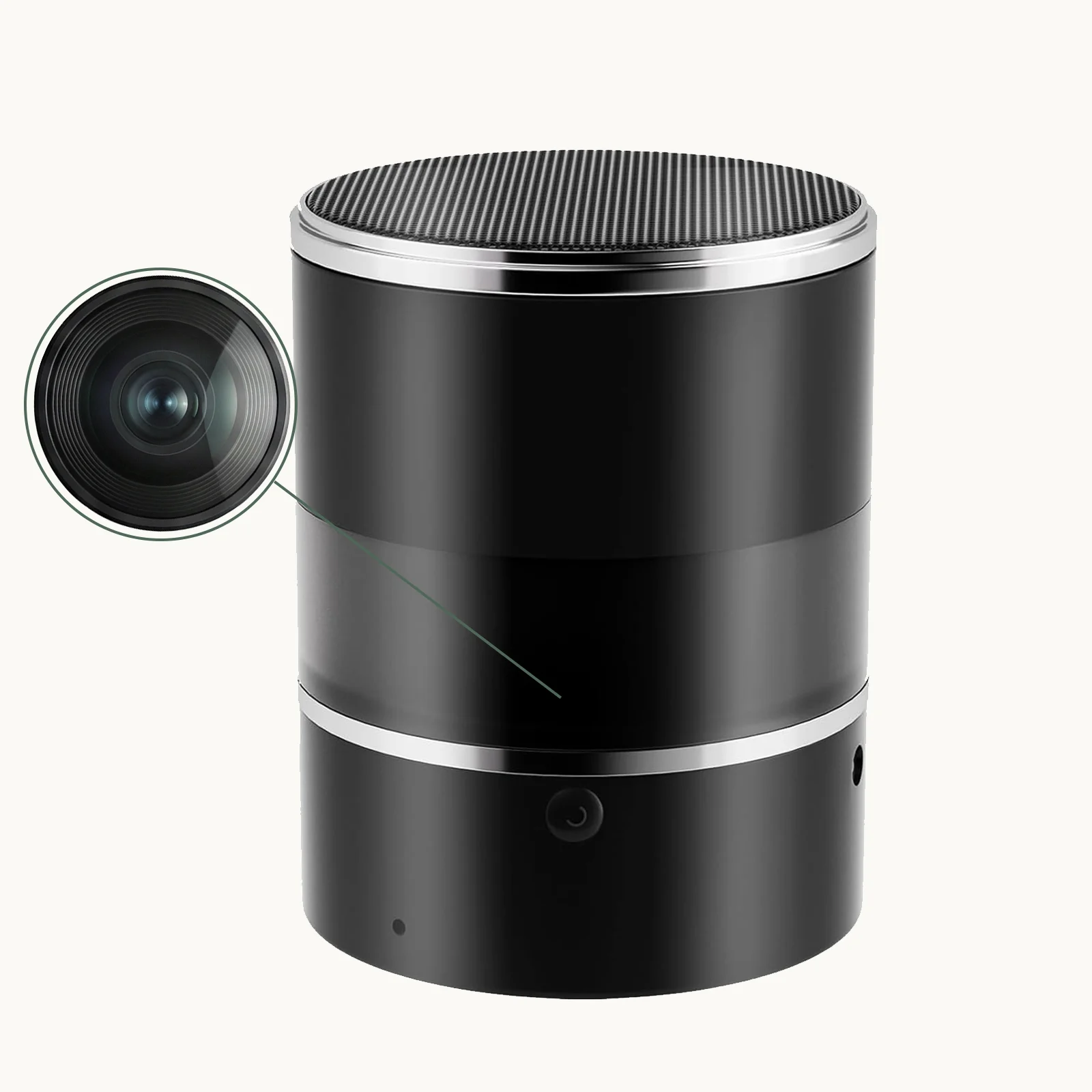
A bluetooth speaker camera works by integrating a miniature camera module into a functional wireless speaker enclosure. The camera lens is hidden behind the speaker grille, typically at the front face, with a small aperture that allows the lens to capture video without being visually obvious. The speaker component connects to your phone or other devices via Bluetooth, playing music and functioning exactly like a standard portable speaker.
The hidden camera operates independently of the speaker function. You can turn the speaker off entirely while the camera continues recording — or use both simultaneously. Most models in 2026 support dual-mode operation where the camera streams live video over Wi-Fi while the speaker plays audio from a paired device.
Key operational components include:
– Miniature HD camera lens — hidden behind the speaker grille, typically 1080p resolution
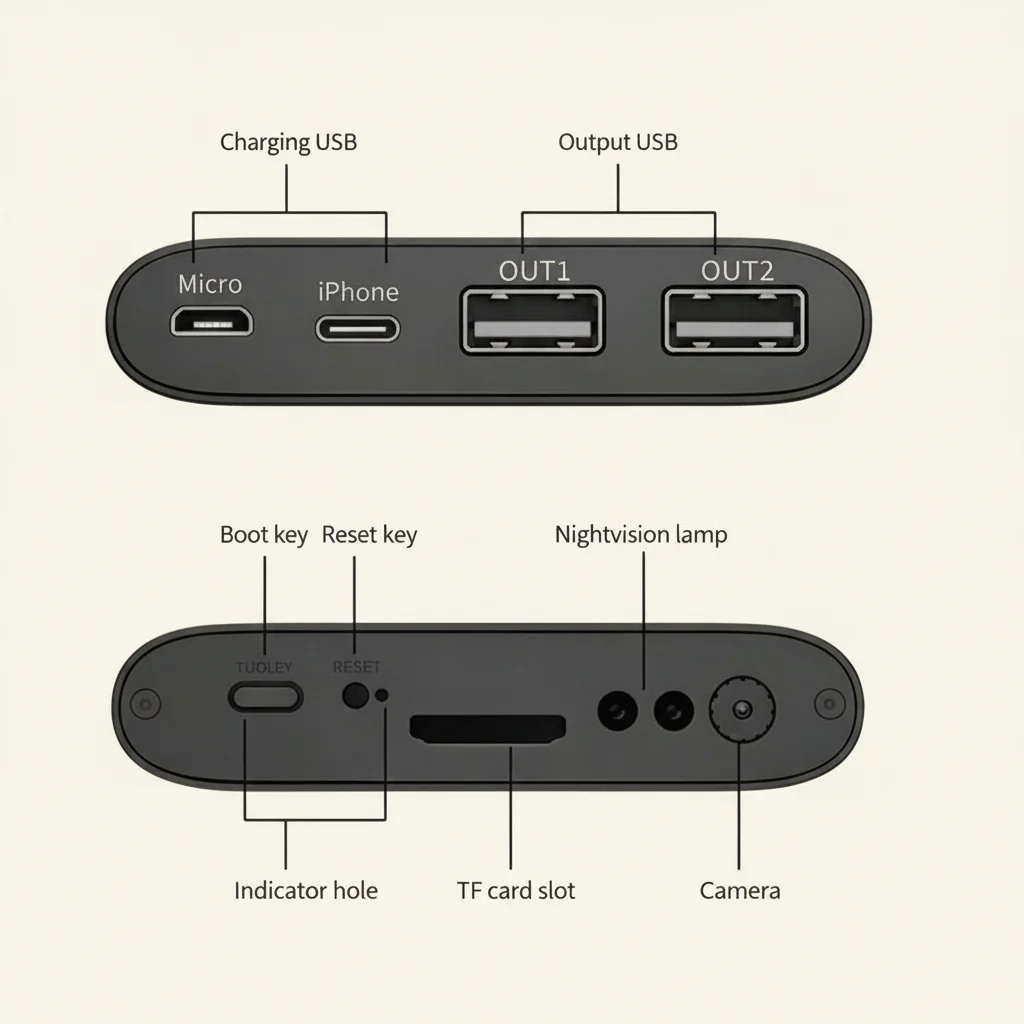
– Wi-Fi module — connects to your home network for remote viewing via a mobile app
– Micro SD card slot — local storage for continuous or motion-triggered recording
– Rechargeable battery — enables portable operation without needing a power outlet
– Speaker drivers — full-range audio playback via Bluetooth 5.0 or higher
IL QZT Bluetooth Speaker Camera models include a rotating lens feature that allows you to adjust the camera angle remotely — a significant advantage over fixed-lens speaker cameras.
What Are the Key Features to Look for in a Bluetooth Speaker Camera?
Not all speaker cameras are created equal. Understanding the specifications that matter most helps you avoid models that look good on paper but underperform in real-world use.
Rotating Lens: One of the most valuable features available in 2026 speaker cameras is a remotely controllable rotating lens. A 180-degree or 360-degree rotation lets you adjust the viewing angle from your phone without physically moving the device. This is especially useful in larger rooms where a fixed lens might miss important areas.
Risoluzione video: 1080p is the minimum acceptable resolution for capturing usable footage. At 1080p, you can identify faces, read text on documents in view, and capture clear evidence. Avoid 720p models unless the lower price reflects a genuine budget constraint.
Visione notturna: Without infrared night vision, your speaker camera becomes blind after dark. Many break-ins and incidents occur at night — make sure your model includes IR LEDs for recording in low-light conditions.
Battery Life vs. AC Power: Portable speaker cameras run on rechargeable batteries, typically providing 3–8 hours of continuous recording per charge. For around-the-clock surveillance, choose models that can run while plugged into AC power continuously, preserving battery for backup use only.
Storage and Cloud Backup: Local SD card storage (up to 128 GB) is standard. Some models offer optional cloud storage subscriptions for off-site footage backup. Cloud storage protects your evidence even if the device is stolen.
Qualità audio: As a functional speaker, audio playback quality matters too. Look for models with at least two full-range drivers and decent frequency response if you plan to use the speaker regularly. The hidden microphone for recording audio should be sensitive enough to capture clear conversation at normal volume from across a typical room.
What Are the Best Uses for a Bluetooth Speaker Camera?
The speaker camera form factor excels in specific environments where its unique combination of features provides maximum benefit.
Home Office and Remote Work Monitoring: With more people working from home, a speaker camera on your desk provides a discreet way to monitor your workspace, verify that anyone entering your home office has authorization, and keep a record of who accessed your equipment during the day.
Nanny and Caregiver Monitoring: Placed in a living room or playroom, a speaker camera provides peace of mind for parents without the ethical complexity of camera placement in private spaces like bedrooms or bathrooms. The speaker function gives it a natural presence — it simply looks like a device someone bought for music.
Small Business Security: Retail counters, reception areas, and back offices benefit from covert monitoring without intimidating customers or employees. A speaker camera on the counter records transactions and interactions without the visible presence of a traditional security camera.
Vacation Rental Monitoring: If you rent out a room or property, a speaker camera provides a way to verify guest compliance with house rules and property conditions without constant physical presence.
Elderly Care and Wellness Checks: A speaker camera with two-way audio allows family members to check on elderly relatives remotely, see them visually, and communicate clearly — all from a device that looks like a normal household speaker.
How to Set Up Your Bluetooth Speaker Camera
Setting up a speaker camera follows a process similar to configuring a standard smart home camera, with the added step of pairing the Bluetooth speaker function.
Step 1: Choose Placement
Position the speaker camera on a stable, elevated surface — a shelf, desk, or counter — with the camera lens facing the area you want to monitor. Avoid placing it in direct sunlight or near heat sources that could affect battery performance and camera electronics.
Step 2: Charge and Power On
Fully charge the device before first use. Most speaker cameras take 2–4 hours for a full charge. Power on the device and wait for the status indicator to show ready.
Step 3: Download the Companion App
Download the recommended app (Tuya Smart, HDLiveCam, or the manufacturer’s specific app) from the Apple App Store or Google Play Store.
Step 4: Connect to Wi-Fi
Follow the in-app instructions to connect the camera to your home Wi-Fi network. Most models use a QR code on the device or an in-app network selection process to establish the connection.
Step 5: Pair Bluetooth (Optional)
If you want to use the speaker function, pair your phone or tablet with the speaker via standard Bluetooth pairing. This is independent of the camera’s Wi-Fi connection.
Step 6: Configure Recording Settings
Set your preferred recording mode — continuous 24/7, motion-triggered only, or scheduled recording. Configure push notification preferences, motion detection sensitivity, and SD card overwrite settings.
Step 7: Test and Calibrate
Test the live view from a different location to confirm remote access is working. Verify that recorded footage is being saved correctly to the SD card or cloud storage.
What Are the Legal Considerations for Using a Speaker Camera?
Hidden cameras raise legitimate legal questions that vary significantly by jurisdiction. Understanding the rules in your area is essential before deploying any covert surveillance device.
Consent Requirements: Many countries and U.S. states require at least one-party consent for audio recording, meaning the person recording (you) can record without informing others. However, some jurisdictions require all-party consent — everyone being recorded must be aware and agree. Video recording typically has fewer restrictions than audio, especially in public or semi-public spaces.
Location Restrictions: The single most important rule is never to place any camera in a location where people have a reasonable expectation of privacy. Bathrooms, changing rooms, and bedrooms — even in your own home if guests or domestic workers are present — are almost universally off-limits for covert cameras.
Workplace Laws: Employees in many jurisdictions have rights regarding workplace surveillance. Hidden cameras in employee-only areas, break rooms, or bathrooms are illegal regardless of employer intent. Check local labor laws and, where required, inform staff about surveillance equipment.
Rental and Lodging: If you rent your property through platforms like Airbnb, special rules apply in many jurisdictions about guest privacy. Covert cameras in rental properties may be restricted or require disclosure to guests.
How Does a Bluetooth Speaker Camera Compare to Other Hidden Cameras?
Understanding how the speaker form factor compares to other common hidden camera options helps you choose the right device for your specific needs.
| Caratteristica | Bluetooth Speaker Camera | Telecamera per rilevatori di fumo | Fotocamera con orologio |
|---|---|---|---|
| Concealment quality | Eccellente | Eccellente | Bene |
| Portatile | Yes, battery-powered | No, wall-mounted | Yes, portable |
| Speaker function | SÌ | No | Sometimes |
| Rotating lens option | Yes (premium models) | Rarely | Sometimes |
| Night vision | Varies by model | Usually yes | Usually yes |
| Ideal placement | Desk, shelf, counter | Ceiling or high wall | Any flat surface |
| Battery backup | SÌ | Limited | SÌ |
The speaker camera’s main advantage is its portability combined with its natural, inoffensive appearance. Unlike a wall-mounted smoke detector or clock camera, you can move a speaker camera from room to room as needed — office today, living room tomorrow.
How To Maintain Your Bluetooth Speaker Camera for Long-Term Reliability
Like any electronic device, a speaker camera benefits from regular maintenance to ensure it continues operating reliably over months and years of continuous use.
Battery Care: Lithium-ion batteries in portable speaker cameras degrade faster when regularly fully discharged. Try to keep the battery between 20% and 80% for optimal longevity. If the device will be stationary for extended periods, keep it plugged in if the model supports simultaneous charging and recording.
Lens Cleaning: Clean the camera lens periodically with a soft, dry microfiber cloth. Dust and fingerprints on the lens behind the speaker grille can reduce image clarity without being obvious during casual inspection.
Aggiornamenti del firmware: Check the manufacturer’s app periodically for firmware updates that may improve camera performance, fix bugs, or address security vulnerabilities. QZT cameras receive regular firmware updates through the Tuya platform.
SD Card Replacement: Replace the micro SD card every 12–18 months, even if it appears to be working fine. SD cards have a limited write cycle lifespan, and a failed card can mean losing all recorded footage without warning.
Storage Management: Regularly back up important footage to cloud storage or an external drive and format the SD card through the app to prevent file system corruption.
Conclusione
A bluetooth speaker camera is one of the most practical and versatile covert surveillance tools available in 2026. Its ability to blend into any room environment — looking like nothing more than a device for playing music — makes it exceptionally difficult for anyone to suspect they are being recorded. With features like rotating lenses, night vision, Wi-Fi remote access, and two-way audio, modern speaker cameras deliver capabilities that rival dedicated security cameras while maintaining complete visual discretion. Whether you are monitoring a home office, keeping tabs on a caregiver, or securing a small business, the QZT Bluetooth Speaker Camera gives you the coverage you need without anyone knowing your space is under watch.
Domande frequenti
Can you use a bluetooth speaker camera while it is recording?
Yes. Most speaker cameras support simultaneous operation — the camera records video while the speaker plays music from a paired device. Both functions operate independently of each other.
How long does the battery last on a bluetooth speaker camera?
Battery life varies by model and recording settings, typically ranging from 3 to 8 hours of continuous recording. Motion-triggered mode can extend this significantly. Most models can also run continuously while plugged into AC power.
Can a bluetooth speaker camera record at night?
Many models include infrared night vision for recording in low-light and dark conditions. Check the product specifications — not all speaker cameras include this feature.
Is it legal to record audio with a bluetooth speaker camera?
Audio recording laws vary by jurisdiction. In some regions, one-party consent is sufficient; in others, all parties being recorded must be aware. Always check local laws before enabling audio recording, and err on the side of caution if you are unsure.
How do I access footage remotely?
Connect the camera to your Wi-Fi network and download the companion app. The app provides live streaming, playback of recorded footage, push notifications for motion events, and remote camera control including lens rotation on supported models.

 English
  Italiano
  Deutsch
  Français
  Español
  Polski