

Setting up the QZT W10 Pen Camera takes under two minutes: insert a FAT32-formatted microSD card, charge the pen via USB until the indicator turns solid, and use the single top button to switch between 1080p video and 30MP photos. Below is the complete setup manual, LED indicator reference, timestamp configuration, and quick fixes for common issues.
1. QZT W10 Hardware Layout, Lens Slider & Reset Point
Before recording, unscrew the barrel of the W10 pen to reveal the internal microSD slot, USB charging connector, and pinhole reset switch. On the upper clip barrel, the small sliding cover lets you conceal the 1080p pinhole lens whenever you carry the pen in a shirt pocket without recording.
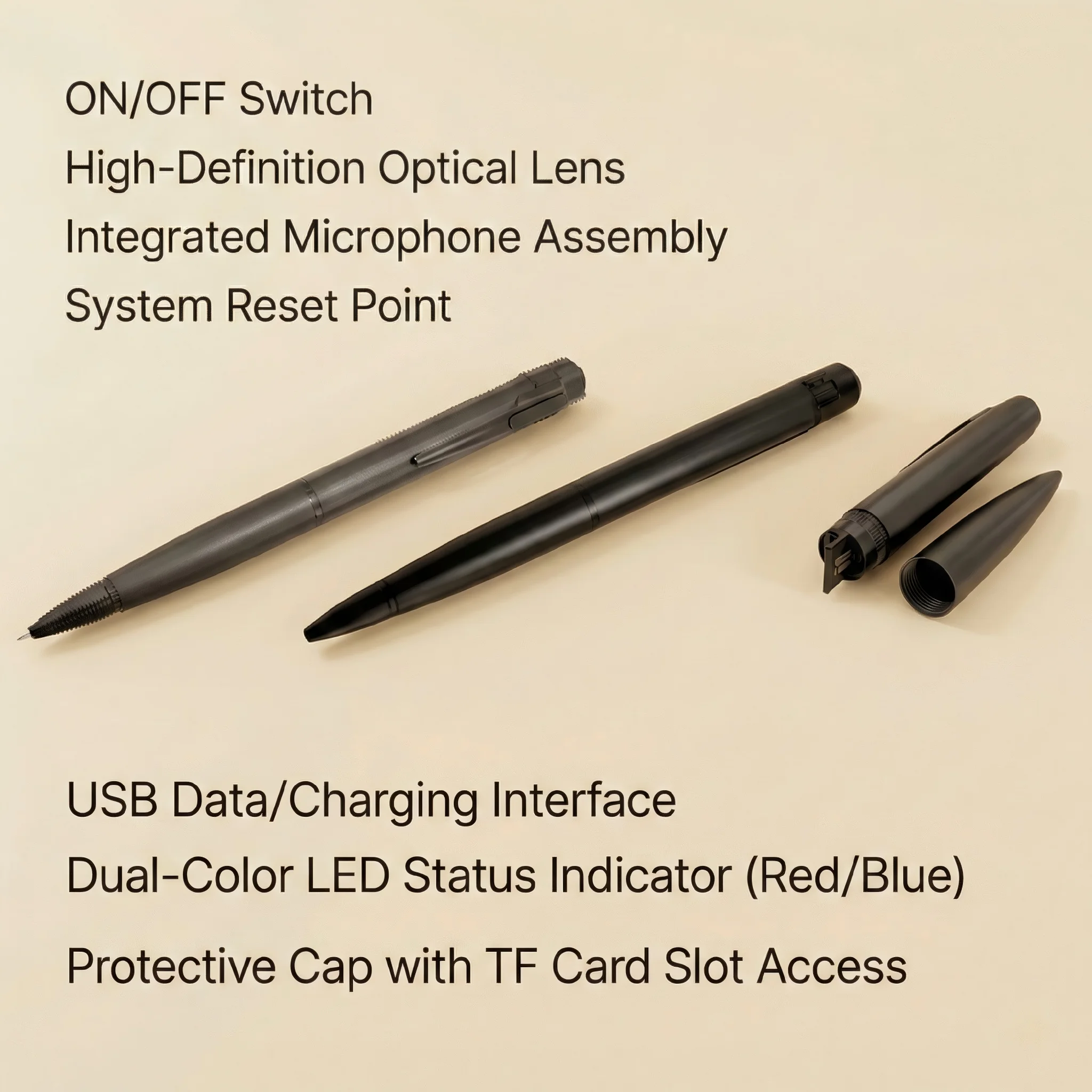
- Top Power / Mode Button: Handles power on, video start/stop, photo capture, and power off.
- Status LED (Rear Clip Side): Confirms standby, video recording, photo shutter, and charging state, then stays dark during active recording.
- Hidden Lens Slider: Slide down to expose the lens before recording; slide up to cover the optics during transport.
- Reset Pinhole: Located near the internal interface; use the included pin if the pen freezes.
2. Charging, microSD Card Requirements & Formatting
The W10 records 1080p AVI video locally to a microSD card and also supports recording while charging when plugged into a 5V/1A power bank or USB adapter. For reliable loop recording, use a genuine Class 10 or U3 card (32GB to 128GB). Cards above 32GB ship in exFAT by default and must be formatted to FAT32 first.
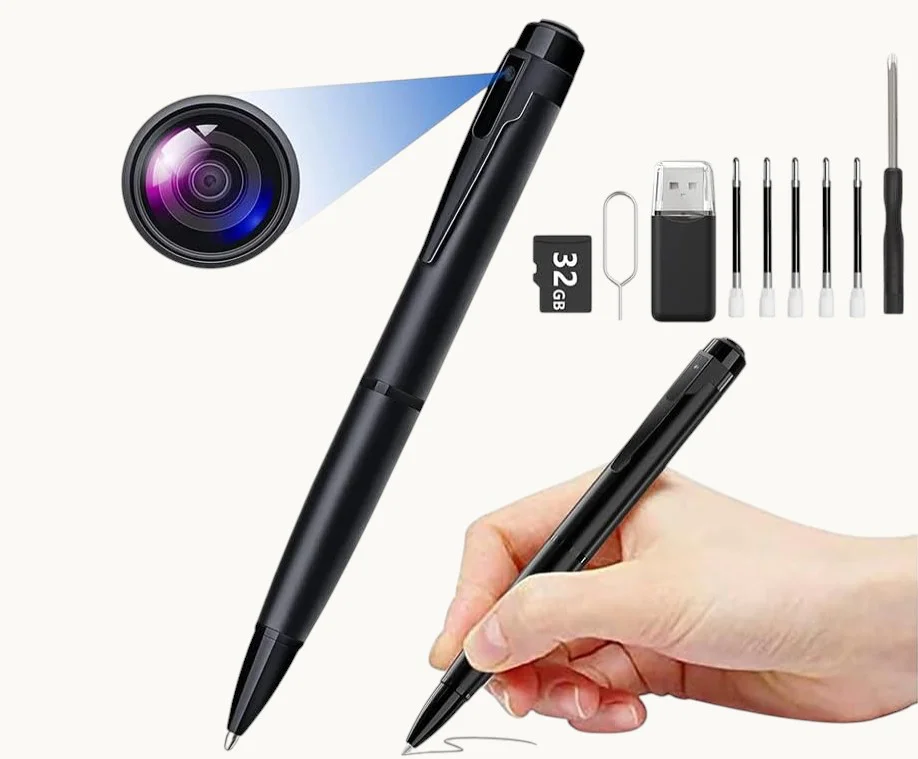
- Insert your microSD card into the supplied USB card reader and connect it to a Windows or macOS computer.
- Format the card as FAT32 (you can use the official SD Memory Card Formatter or follow our spy camera SD card formatting guide).
- Charge the W10 for 90–120 minutes before first use until the charging indicator stays steady.
- Insert the card with the metal contacts facing the PCB until it clicks cleanly into place.
3. One-Button Video, 30MP Photo Mode & Timestamp Sync
The W10 uses one top button so you never have to look down during a meeting or lecture. Check the sequence below to avoid accidentally saving blank standby sessions.

| Action | Button Press | LED Behavior |
|---|---|---|
| Power On (Standby) | Hold top button 2–3 seconds | Indicator lights solid |
| Start / Stop 1080p Video | Press once from standby (or double-press per firmware batch) | Flashes 3 times, then turns off while recording; press once to save & return to standby |
| Take 30MP Photo | Quick single tap in photo mode | Flashes once per shutter capture |
| Power Off | Hold top button 4–5 seconds | Flashes rapidly and powers down |
How to set the date & time watermark: After your first test clip, connect the W10 (or its microSD card) to your computer. Open the auto-generated time.txt file in the root directory, edit the string to the current time (for example, 2026-11-20 14:30:00 Y — change Y to N if you want to hide the overlay), save the file, eject safely, and start a short test recording to lock in the clock. For smooth AVI playback on Windows or Mac, use VLC Media Player.
4. Common W10 Troubleshooting & Quick Fixes
Most pen camera issues trace back to an exFAT card, a loose USB cable, or a depleted battery that cut power before the final file closed.

- Pen turns off after 5 seconds: The microSD card is missing, unseated, or formatted as exFAT instead of FAT32. Re-format to FAT32 and reinsert until it clicks.
- Video file will not play or shows 0 KB: Always stop recording and wait 2 seconds before holding power off so the AVI index writes properly.
- Indicator light freezes: Press the recessed reset pinhole gently for 3 seconds using the included pin, or check our factory reset checklist.
- Need replacement parts or a WiFi upgrade? Browse the full QZT Pen Camera collection or contact QZT Support with your order number.
Frequently Asked Questions
Does the QZT W10 need WiFi or a phone app to record?
No. The W10 is a standalone local-recording spy pen camera that saves 1080p video and 30MP photos directly to a microSD card, which gives it longer battery runtime and zero WiFi setup friction. If you need live phone viewing, look at WiFi-enabled models in our Hidden Cameras catalog.
Can the W10 record while plugged into a power bank?
Yes. Connect the W10 to a standard 5V/1A USB power bank or wall adapter to record continuously until the microSD card loops over older segments.
Why is my footage upside down or slightly tilted?
Check the pocket clip orientation—the lens is calibrated to sit upright when the clip faces forward in a breast pocket or rests vertically in a pen holder.
How much footage fits on a 64GB microSD card?
A 64GB card holds roughly 5 to 7 hours of 1080p AVI video depending on scene motion and lighting. Loop recording automatically overwrites the oldest segment once the card fills up.
Are QZT pen cameras legal to use?
Recording laws vary by country and state, especially regarding audio consent in private spaces. Always comply with local privacy and workplace disclosure rules.
 English
 Italiano
 Deutsch
 Français
 Español
 Polski